Build and manage resume versions.
Resume Builder is a section-based editor with a live PDF preview. Start from your RoleReady profile, an existing resume, or a blank document, then save the result as a reusable or job-linked version.
Create a resume and keep its versions organized
-
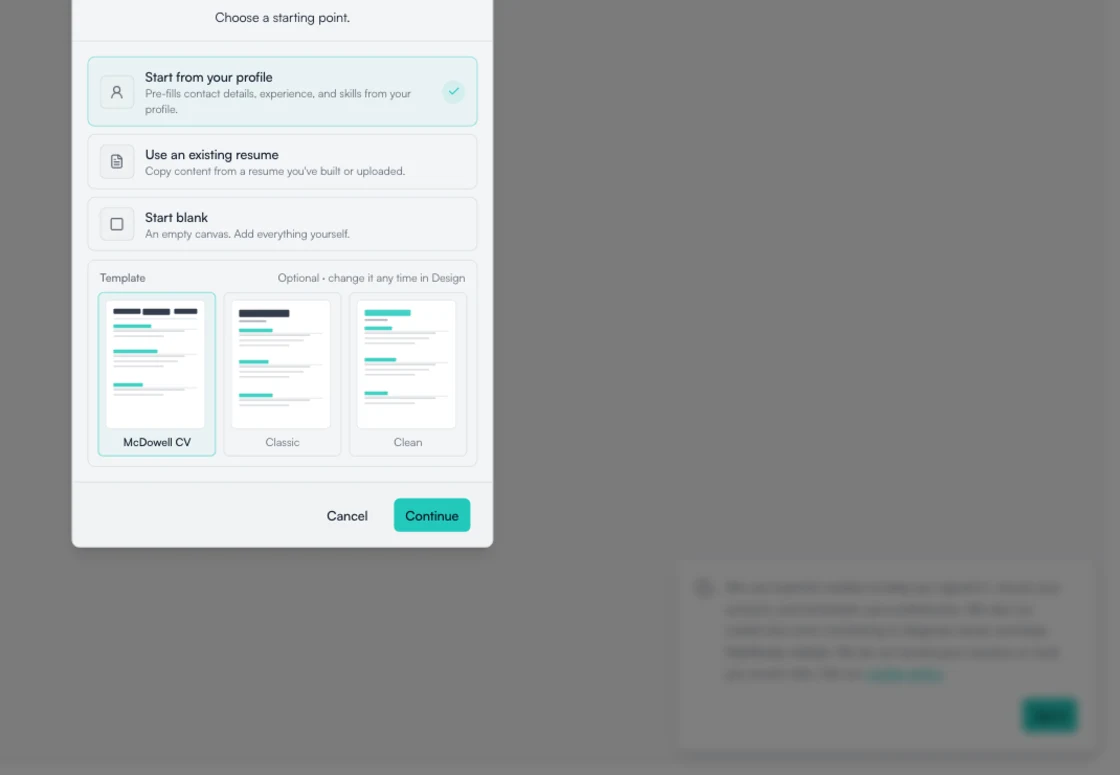
Choose how to begin
Pre-fill a resume from your profile, use an existing resume from Documents, or start with an empty structure. Linking a tracked job is optional.
-
Edit sections beside the PDF
Update personal details, summary, experience, education, skills, projects, certifications, awards, and design settings while the preview reflects the document.
-
Save, restore, and download versions
Save changes, save a separate version, restore version history, open the PDF, or download it. A job-linked version stays associated with that application.
How a resume becomes a saved PDF
Choose a starting source, edit the sections, review the document, and save the version you want to keep. You can associate it with a job before or after editing.
Tailor a version for a tracked jobHow it works
- Choose your profile, a resume, or a blank document
- Add an optional tracked job
- Edit the resume sections
- Review the live PDF
- Save or download the version
Availability
- Start from your Knowledge Bank profile, an imported resume file, or a blank document.
- File import supports PDF, DOC, DOCX, TXT, and Markdown files.
Build a resume
Choose a starting source, edit the sections, and save a PDF version.
- Free forever plan
- No credit card needed
- Cancel anytime