Track every application from one board.
RoleReady turns each job into a working application record. Add roles manually, by CSV, from Job Bank, or with the Chrome extension, then keep every status change and supporting item with the job.
Add, organize, and update every role you pursue
-
Add a posting without rebuilding it
Create a job manually, import a CSV, add a role from Job Bank, or capture a posting with the Chrome extension.
-
Move jobs through real application stages
Use the board to move roles through Target, Applied, Interviewing, and Offer. Filters, saved views, priorities, and multiple boards help narrow the work in front of you.
-
Keep application work with the job
Store resumes, letters, interview prep, calendar events, contacts, notes, and offer details with the tracked role they support.
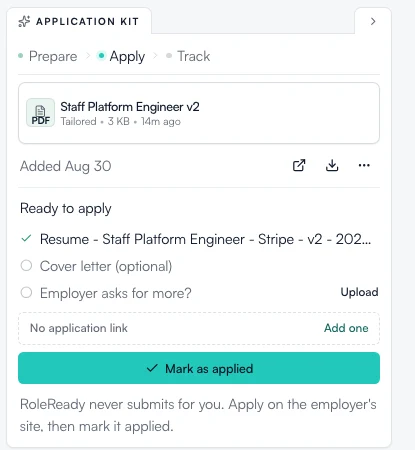
Every application walks through Prepare, Apply, Track.
The Application Kit inside each tracked job moves the work forward one stage at a time, and the rail shows only what the current stage needs. Your tailored resume, the ready-to-apply checklist, and the application link stay together on the job.
- Prepare Tailor a resume for the role and pull the posting details together.
- Apply Work from a ready-to-apply checklist, then submit on the employer’s site yourself.
- Track Mark it applied and follow the response from the board.
RoleReady never submits for you. Apply on the employer’s site, then mark it applied.
How a posting becomes a tracked application
Add the role, check the details, place it on the right board, and update its stage as the employer responds. The same record holds the work you create along the way.
See the Chrome Extension Add to ChromeHow it works
- Add the posting
- Review the job details
- Place it on a board
- Move it through the application stages
- Keep documents, prep, events, and offers attached
Availability
- Add jobs manually, by CSV import, or straight from Job Bank search.
- The Chrome extension captures postings in one click from any board.
Which job boards does the extension support?
It has dedicated support for LinkedIn, Indeed, Glassdoor, Greenhouse, Lever, and Workday, with generic capture for other career pages. RoleReady checks the posting URL and known related URLs for an existing job before adding another record.
Start tracking applications
Add a role to your board and keep its status and supporting work together.
- Free forever plan
- No credit card needed
- Cancel anytime