Compare job offers on compensation and deadlines.
Offer Comparison stores structured terms for each tracked job and places active offers side by side. Enter details manually or extract them from a letter, compare annualized compensation, and keep decision dates visible.
Record the terms, compare the totals, and review tradeoffs
-
Store the terms that affect the decision
Track base salary, fixed or percentage bonus, signing and relocation payments, equity terms, PTO, retirement match, benefits, level, location, start date, and decision deadline.
-
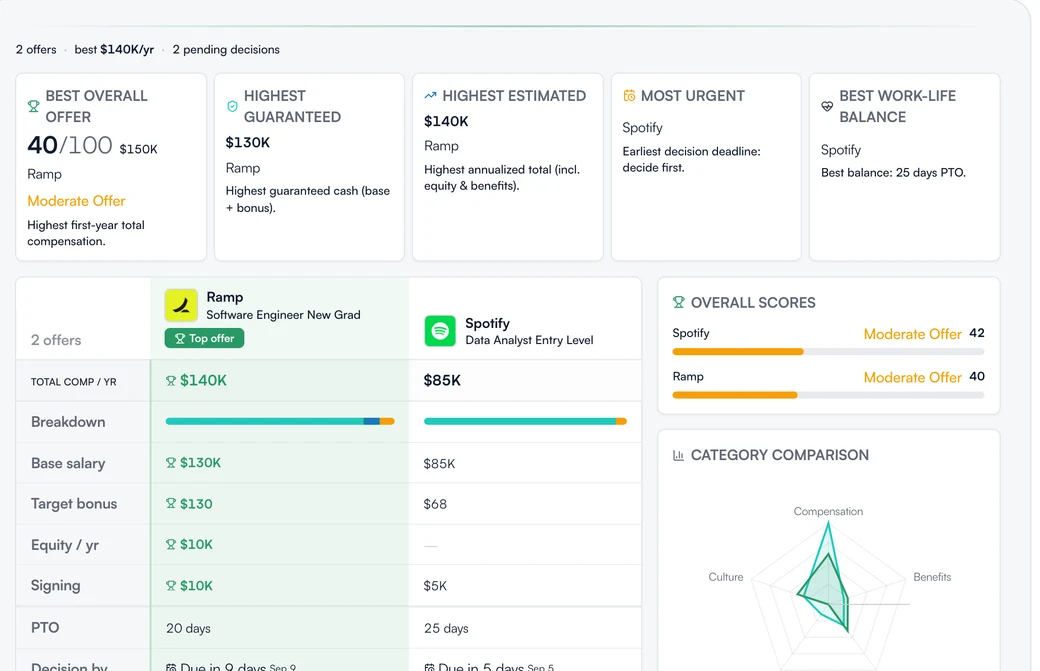
Review active offers side by side
RoleReady calculates annualized compensation from the fields you enter, annualizes equity over its vesting period, highlights top values, and sorts by total compensation or deadline.
-
Ask for a priorities-based comparison
Select 1 to 8 offers and describe what matters to you. Offer Advisor can return a recommendation, confidence, factor comparison, tradeoffs, risks, negotiation levers, and questions to ask.
How offer terms become a comparison
Add the offer manually or extract a draft from pasted text or a supported file, review and correct the fields, then compare active offers and their deadlines.
Put each decision deadline on CalendarHow it works
- Open the tracked job with the offer
- Enter terms or extract them from a letter
- Review compensation, equity, benefits, and dates
- Compare active offers side by side
- Optionally run Offer Advisor with your priorities
Availability
- Offer Advisor accepts 1 to 8 offers. It may return no recommendation when the available information is too limited or the offers are too close.
- Every Offer Advisor result says it works from the details you entered and your stated priorities, with a note to sanity-check it against your own judgment.
- RoleReady does not convert currencies. Compare compensation totals only when the offers use the same currency.
- Saving a received offer with a decision deadline creates or updates a linked Calendar event.
Can I evaluate a single offer?
Yes. Offer Advisor accepts one offer and frames the result around accepting, negotiating, or walking away instead of making a head-to-head comparison.
Compare offers
Record the terms, check the deadlines, and review the compensation side by side.
- Free forever plan
- No credit card needed
- Cancel anytime